GST SSO Login, RGHS, SIPF, and Admit Card Access via SSO ID
Beyond eMitra and recruitment, your SSO login also connects to several other essential Rajasthan government services — GST filings for business owners, RGHS health scheme access for employees and pensioners, SIPF records, and admit card downloads for various state exams. This page covers how to access each of these through your SSO ID, in one place.
GST SSO Login: Accessing GST Services Through Your SSO ID
GST sso login allows registered business owners in Rajasthan to manage state-linked GST filings and related compliance tasks directly through their SSO dashboard, rather than maintaining a separate login for GST-related state services.
How Do I Access the GST Portal Using My SSO ID?
- Log in to the official SSO Rajasthan portal using your SSO ID and password.
- Locate the GST or “GST Prime” tile on your dashboard, typically listed under business or Udyog-related services.
- Click into the GST section to view filings, compliance status, and related state-level GST services.
- If this is your first time accessing GST services, you may need to link your GST registration number or Udyog Aadhaar to your SSO profile before full access is available.
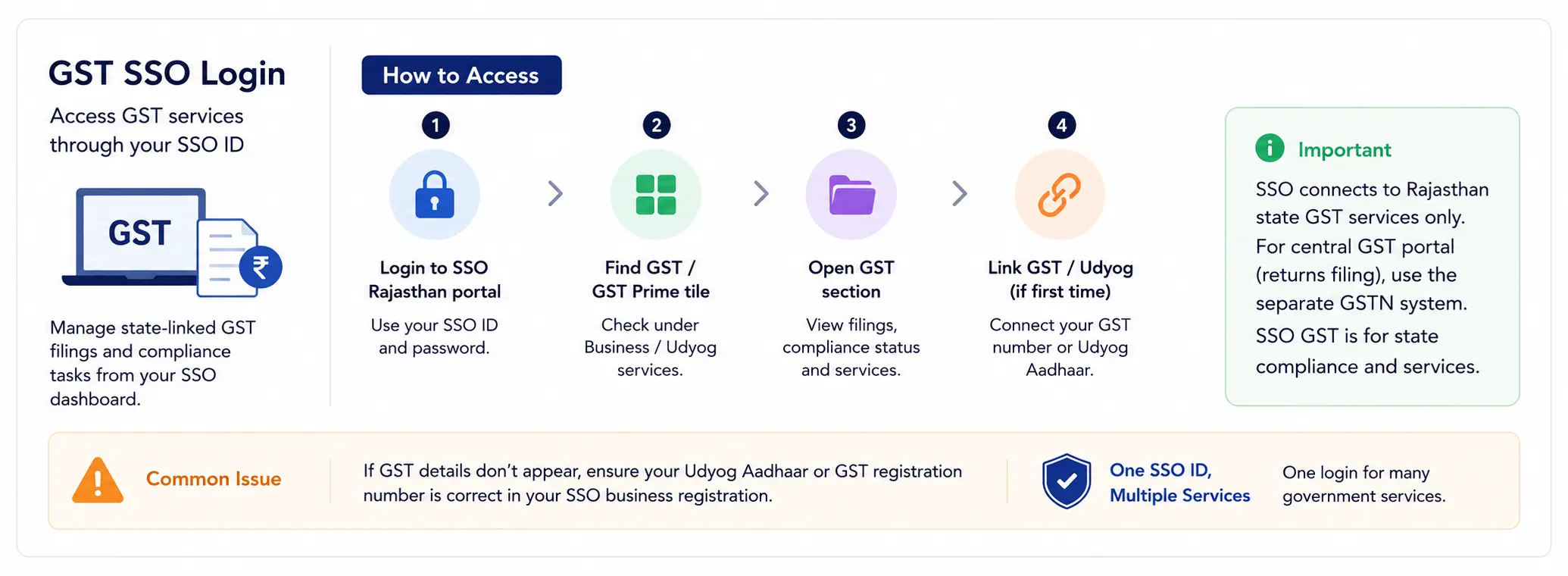
It’s worth noting that your SSO login connects specifically to Rajasthan state-linked GST services and compliance tracking. For the central GST portal used for actual return filing at the national level, you’ll still use the separate GSTN system maintained by the central government — the SSO-linked GST section here is focused on state-specific business compliance and services tied to your Rajasthan registration.
Common GST SSO Login Issues
If your gst sso id login doesn’t show the expected business details, check that your Udyog Aadhaar or GST registration number was entered correctly during your original SSO registration under the business category. Mismatched or missing business registration details are the most common reason the GST tile doesn’t display complete information.
RGHS SSO Login: Health Scheme Access for Employees and Pensioners
RGHS, the Rajasthan Government Health Scheme, provides medical benefits to government employees and pensioners, and it’s accessed directly through the same SSO login used across other services.
How Can I Check RGHS Status Through SSO Login?
- Log in to your SSO account using your SIPF ID or registered employee credentials.
- Open the RGHS tile from your dashboard.
- View your current scheme enrollment status, empanelled hospital lists, and any pending or approved claims.
- For pensioners, the same login typically shows pension-linked health benefit details alongside active RGHS coverage information.
If your RGHS status doesn’t appear correctly, the most common cause is a mismatch between your SSO profile and your official employment or pension records. In this case, contacting your department’s administrative office to confirm your SIPF ID is correctly linked usually resolves the discrepancy faster than troubleshooting through the portal alone.
RGHS Login Access for Family Members
RGHS benefits typically extend to eligible dependents of the primary employee or pensioner. While the login itself remains tied to the primary account holder’s SSO ID, family member details and their coverage status are usually visible within the same RGHS section once properly linked during initial enrollment.
SIPF Portal SSO Login: Provident Fund and Insurance Records
SIPF, the State Insurance and Provident Fund system, is where Rajasthan government employees track their provident fund balance, insurance coverage, and related financial records tied to their employment.
What Is SIPF Portal Login and Who Can Use It?
SIPF portal sso login is intended specifically for Rajasthan government employees, since it’s directly tied to employment-linked financial records that don’t apply to citizens or business owners. Employees log in using their SIPF ID, which also generally serves as their SSO login credential when they registered under the government employee category.
Through the SIPF portal, accessible from the SSO dashboard, employees can typically:
- View their current provident fund balance and contribution history
- Check insurance coverage details tied to their employment
- Download statements or related documents for personal record-keeping
- Update certain personal details linked to their SIPF record, where permitted
Since SIPF access is closely tied to verified employment records, any employee who registered under the wrong category (citizen instead of government employee, for example) may not see the SIPF tile at all. In that case, the fix usually involves confirming the correct registration category with your department’s administrative office rather than trying to force access through the standard citizen login flow.
Admit Card Download Through SSO ID Login
Beyond recruitment-specific applications, various Rajasthan state exams and departmental tests make admit cards available directly through the SSO login system.
How Do I Download My Admit Card Using SSO ID Login?
- Log in to your SSO account using your registered credentials.
- Navigate to the recruitment, exam, or specific department tile relevant to the exam you applied for.
- Look for an “Admit Card” or “Hall Ticket” download option, which typically becomes available a set number of days before the scheduled exam date.
- Click download, and verify all printed details — your name, roll number, exam center, and exam date — carefully.
- Print or save a digital copy, since most exam centers require you to bring either a printed or clearly displayed digital admit card on exam day.
If your admit card isn’t available yet despite the exam date approaching, this usually means the specific department hasn’t released it yet rather than indicating a problem with your account. Departments typically announce admit card release dates in advance through the same notification section on the portal.
SSO Login for Government Employees: A Quick Overview
Since GST, RGHS, SIPF, and certain admit card categories are all relevant primarily to government employees and business owners rather than general citizens, it’s worth summarizing how the government employee SSO ID login experience differs slightly from a standard citizen account:
| Service | Who Uses It | Login Credential |
|---|---|---|
| Business/Udyog owners | Business-linked SSO ID | |
| Employees and pensioners | SIPF-linked SSO ID | |
| Government employees | SIPF ID | |
| Exam applicants (citizens or employees) | Standard SSO ID |
Regardless of which of these services you’re accessing, the login screen and general SSO login process itself remains identical — the difference lies entirely in which service tiles appear on your dashboard based on your registration category and linked records.
Troubleshooting Access to These Services
A few checks apply broadly across GST, RGHS, SIPF, and admit card access issues:
Confirm Your Registration Category
Confirm your registration category is correct. Many access issues with these specific services trace back to registering under the wrong category during initial SSO signup.
Check Department-Linked IDs
Check that department-linked IDs are properly entered. Whether it’s a GST registration number, SIPF ID, or exam application reference, small entry errors during registration or linking are the most frequent cause of missing or incomplete service tiles.
Allow Time for Backend Verification
Allow time for backend verification. Unlike simple citizen services like eMitra, these employee and business-linked services sometimes require backend cross-checking against departmental records, which can take slightly longer to reflect on your dashboard after initial registration or linking.
Contact the Relevant Department
Contact the relevant department directly for record mismatches. If your SSO login is working correctly but a specific service still shows incorrect information, the discrepancy is usually in the department’s own records rather than the SSO system itself, and correcting it typically requires reaching out to that department directly.
Why These Services Are Grouped Under One SSO Login
GST, RGHS, SIPF, and admit card access might seem like unrelated services at first glance, but they share a common thread: each one is tied to a specific, verifiable status a person holds — being a registered business, being a government employee, being a pensioner, or being a registered exam candidate. Rather than building separate verification systems for each of these categories, the Rajasthan government routed all of them through the same SSO login infrastructure, using the registration category selected during signup to determine which services appear on a given user’s dashboard.
This approach has a practical benefit for residents who fall into more than one category over time. A government employee who also owns a small side business, for example, doesn’t need two separate logins — their single SSO ID can reflect both their SIPF-linked employee services and their Udyog-linked GST access, as long as both sets of details are correctly registered against the same profile.
Keeping Employee and Business Records Accurate Over Time
Since RGHS, SIPF, and GST access all depend on backend records staying in sync with your SSO profile, life changes — a promotion, a transfer to a different department, a new business registration, or a change in pension status — can occasionally cause a temporary mismatch until departmental records catch up. A few practices help minimize disruption:
- After any change in employment status, check your SIPF and RGHS tiles within a few weeks to confirm the update has been reflected correctly.
- If you register a new business or update existing GST details, verify the change appears under your SSO-linked GST section rather than assuming it will sync instantly.
- Keep copies of official confirmation documents — such as a transfer order or business registration certificate — on hand in case a department needs proof to correct a mismatch manually.
- Report discrepancies as soon as you notice them rather than waiting, since resolving an old, long-standing mismatch can take longer than catching and correcting a recent one.
Admit Card Access Across Different Exam Types
Admit card downloads through SSO login apply broadly across various types of state exams — recruitment exams for citizen applicants, internal departmental exams for existing employees, and promotional or eligibility exams tied to specific service cadres. While the general download process stays consistent across these categories, where the admit card tile appears on your dashboard can differ slightly:
- Citizen recruitment exams typically show their admit card option under the recruitment or RajKaj tile.
- Internal departmental or promotional exams for existing government employees are often listed separately, sometimes under a department-specific tile rather than the general recruitment section.
- Professional or licensing exams administered by specific boards may appear under a dedicated tile named after that board or department.
If you’re unsure where a specific exam’s admit card will appear, checking the original exam notification is usually the fastest way to confirm which section of your SSO dashboard to look under, since notifications typically specify this in advance.
Frequently Asked Questions About GST, RGHS, SIPF, and Admit Card SSO Login
Final Notes on Government Services Through SSO Login
GST, RGHS, SIPF, and admit card access all demonstrate how deeply integrated the SSO login system has become across different categories of Rajasthan government services. Whether you’re a business owner managing compliance, an employee tracking your provident fund, or a candidate downloading an admit card, the same single SSO ID carries you across all of these services, as long as your registration details and department-linked records stay accurate and up to date.